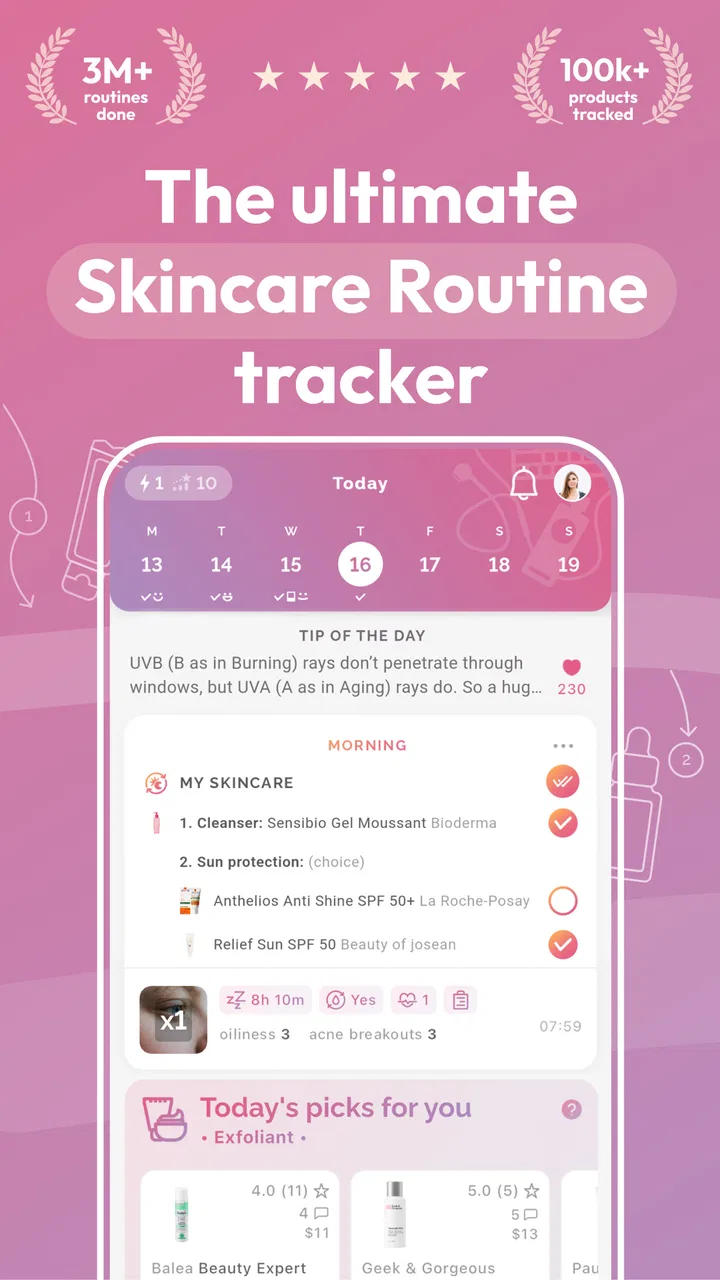
Skincare Routine: FeelinMySkin
- 4.7
- Rating
- 100.00K
- Installs
- Free
- Price

 Analysis by App-foxy
I approached Skincare Routine: FeelinMySkin as someone trying to make a skincare habit easier to follow, not as a replacement for a dermatologist. The app sits in the beauty category and combines product scanning, routine planning, acne-conscious guidance, journaling, and a community space. That mix makes it more practical than a simple reminder, although it also means the experience can feel broader than users who only want a minimal checklist may expect.
What I like immediately is the app’s focus on turning scattered products into a repeatable routine. Many people own a cleanser, treatment, moisturizer, and sunscreen but still apply them inconsistently or forget which product caused irritation. FeelinMySkin is designed around that everyday problem. It gives you a place to organize what you use, observe how your skin changes, and build a more deliberate pattern instead of relying on memory.
How FeelinMySkin feels in everyday use
I find the most useful way to judge FeelinMySkin is by asking whether it helps me make calmer choices, rather than expecting it to settle every skincare question. Its planner and journal can give everyday decisions a useful structure, while product research still calls for personal judgment. That distinction matters most when I’m deciding what to record, what to share, and when to seek advice beyond an app.
You May Also Like

 Blood Strike: 2.5 Anniversary
Blood Strike’s Loadouts Turn Every Drop Into a Tactical Gamble
A close look at Blood Strike’s custom loadouts: how fast access to signature weapons reshapes its battle royale rhythm, rewards preparation, and narrows the gap between fights.

 Pandora - Music & Podcasts
Pandora’s Music Is Easy to Start, but Harder to Recover
Pandora’s strength is its low-effort path from a seed to a station. Its weak spot is how much confidence it asks you to place in connection, setup, and quiet recovery.

 8 Ball Pool
 Is Built on Rivalries, Rematches, and Routine
A close look at the rivalries, rematches, shared routines, and unanswered safety questions that turn a quick pool match into a persistent mobile community.

 Samsung Music
’s Quiet Strength Is Playing What You Already Own
Its reach comes less from spectacle than from dependable access to a personal library. That simplicity is both the app’s strongest retention engine and its ceiling.

 AccuWeather: Weather Radar
AccuWeather Review: A Quick, Clear Forecast for Everyday Decisions
For everyday plans, the best forecast is the one you can understand quickly. AccuWeather makes rain timing, radar, and local conditions easy to act on, with a few trade-offs.

 Hill Climb Racing
Why Hill Climb Racing Still Turns Crashes Into One More Run
A tiny car, a bumpy hill and one more upgrade: Hill Climb Racing keeps resurfacing because its simple chaos makes every near-miss feel personal.
More From Our News Desk



A gentle start instead of an overwhelming setup
The most useful way to begin is to treat the app as a skincare notebook with planning tools. I would not add every product in a bathroom cabinet on the first day. Start with the products you actually use most often, create a simple morning and evening structure, and then add extras only when you know they belong in your routine.
That approach matters because skincare apps can become counterproductive when they encourage too much experimentation. A long product list looks organized, but it does not necessarily produce better skin. FeelinMySkin works best when you use it to reduce confusion: record the basics, follow them consistently, and make one change at a time.
The cosmetics scanner is a helpful part of that process. It can make product research feel less tedious than manually typing every detail, particularly when you are standing in a store or checking an item you have just bought. I would still treat a scan as a starting point rather than an automatic medical verdict. Ingredient interpretation depends on context, concentration, personal sensitivity, and how the rest of your routine fits together.
The strongest workflow is scan, review, record, then observe. In other words, use the scanner to gather information, use the planner to decide when a product belongs, and use the journal to see whether your skin actually tolerates it. That separation prevents the common mistake of assuming that an ingredient list alone can predict your personal result.
Speed expectations and the cost of checking everything
For ordinary planning and journaling, I would expect the app to feel relatively light because those tasks are simple and focused. Opening a routine, marking progress, or adding a short note should not require the same effort as researching a full shelf of cosmetics. The experience is most efficient when you already know what you want to record.
Scanning and exploring are different. They naturally involve more steps because you are asking the app to identify or evaluate a product rather than simply save a note. If you scan several items in succession, the process may feel slower than writing down a product name yourself, but that extra effort can be worthwhile when you are comparing unfamiliar cosmetics.
I would avoid judging the app by a single quick session. Its value builds through repeated use. The first visit is about setup; later visits are about spotting patterns. That means the app may feel less instantly rewarding than a basic reminder, yet more useful after you have accumulated enough routine history to notice what you changed and when.
There is also a practical speed tip: keep journal entries specific and short. “More redness after new exfoliant” is more useful than a vague paragraph about having a bad skin day. Recording the product, approximate timing, and visible change gives you something you can act on later without turning skincare into paperwork.
What happens during heavy-use moments
The busiest moments are likely to be product discovery, routine rebuilding, and periods when your skin changes quickly. A new skincare haul can tempt you to scan and add everything at once. That is where I think restraint improves the experience. Adding many products together makes the app more crowded and makes your journal harder to interpret because you will not know which change produced which reaction.
A better use case is preparing for a routine reset. I would scan or record the products I already own, separate essentials from occasional treatments, and create a small morning and evening plan. Then I would leave the journal available for notes about dryness, breakouts, stinging, or improved comfort. This gives the app a clear job instead of asking it to manage every possible beauty decision.
The community element can also become more demanding during heavy browsing. Community advice may provide ideas and reassurance, but it should not override your own tolerance or professional guidance. Skincare discussions often simplify complicated issues, and a routine that works for one person may be unsuitable for another. I see the community as a source of questions to investigate, not a substitute for careful judgment.
For acne-prone users, the acne-safe focus is potentially valuable because it encourages more cautious product selection. Still, “acne safe” should not be read as a promise that a product will treat acne or suit every individual. If you have painful, persistent, or worsening symptoms, an app can help you organize observations for a medical appointment, but it should not be the only source of care.
Reliability: useful records, sensible expectations
Reliability here is less about dramatic automation and more about whether the app helps you maintain a dependable record. A routine planner is only useful if you return to it, and a journal only becomes informative if your entries are consistent. I would use the same basic descriptions each time, such as dryness, oiliness, redness, or irritation, rather than changing the vocabulary from one day to the next.
That consistency creates a clearer personal history. It can help you remember when you introduced a product, whether you used it every day, and whether a reaction appeared immediately or gradually. This is one of the app’s less obvious strengths: it can reduce the role of memory in skincare decisions. People often blame the newest product without remembering that they also changed cleanser, exfoliant, or sunscreen during the same week.
At the same time, journaling does not turn personal observations into a controlled test. Skin changes with weather, stress, sleep, hormones, shaving, and other factors. I would therefore look for repeated patterns rather than treating one entry as proof. The app is most reliable as an organizing tool, not as a diagnostic instrument.
The developer, FeelinMySkin, has positioned the app around this combination of planning and reflection rather than a single-purpose product database. That gives it a broader role than a basic reminder, but it also asks the user to participate. If you never record changes or review your routine, the extra features will not create useful insight on their own.
Device constraints, storage, and practical comfort
The app supports Android devices running 7.0 or later, which makes it accessible to many older phones as well as newer models. On an older device, I would keep expectations realistic when moving between scanning, product information, journaling, and community content. Simple screens should be comfortable, while image-based or content-heavy areas may feel less immediate depending on the phone and connection.
Resource demands are also likely to vary by what you are doing. A short journal entry is a modest task. Repeated scanning and browsing visual product content are more active uses, especially if you are working through a large collection. I would not keep the app open unnecessarily while shopping; scan what you need, make a decision, and close it when finished.
Screen size affects comfort too. A compact phone can make detailed ingredient text or long community discussions less pleasant to inspect. That is not a reason to reject the app, but it does make the scanner and routine planner more attractive than extended reading sessions. If your main goal is careful ingredient research, a larger screen or a dedicated reference source may be easier for comparison.
Because the app includes several types of activity, organization matters more than raw device power. Keep the routine simple, archive habits you no longer follow, and avoid turning the journal into a daily essay. Those choices reduce friction regardless of whether you use an older Android phone or a recent device.
Free access and where the paid model matters
FeelinMySkin is free to install, with optional in-app purchases ranging from $4.99 to $39.99 per item. That makes it reasonable to try before deciding whether its deeper tools fit your habits. I would spend time with the free experience first rather than paying immediately, especially if your needs are limited to a basic routine and occasional notes.
The purchase range suggests that some expanded value may sit behind optional upgrades. The important question is not whether paid features exist, but whether they solve a problem you actually have. Someone managing a detailed product collection may find additional tools worthwhile, while a person who only needs two daily reminders may be better served by the phone’s built-in reminders or a simple notes app.
This is also where the app differs from usual alternatives. A notes app is more flexible but gives you no skincare-specific structure. A standard habit tracker is excellent for repetition but usually lacks product context and cosmetic scanning. A retailer’s product page may provide shopping information, yet it is not designed to help you observe your skin over time. FeelinMySkin sits between those options: more specialized than general tools, but less authoritative than professional medical advice.
Who will get the most from it
I think the app is a good match for someone who owns several skincare products and frequently forgets the order, timing, or reason for using them. It is also useful for beginners who want to slow down before buying another treatment. The combination of a planner and journal encourages a calmer process: establish a baseline, introduce changes carefully, and review what happened.
It may be especially helpful after a shopping trip. Imagine buying a new cleanser and moisturizer on a Saturday, then feeling irritated by Tuesday. Instead of guessing, you can check whether both products entered the routine together, review your notes, and decide whether to pause one change. That does not identify the cause automatically, but it gives you a much better record than memory alone.
The app can also help people preparing for a dermatology visit. A concise history of products, timing, and reactions may make the conversation more productive. I would keep the notes factual and avoid presenting the app’s organization as a diagnosis. The benefit is improved recall, not medical certainty.
Who should choose something simpler
I would skip this app if you dislike logging, never change products, or already have a routine that you follow without confusion. In that case, a paper note or ordinary reminder may be quicker and less distracting. More features are not automatically better when your real need is simply remembering sunscreen in the morning.
I would also be cautious if you expect the scanner to make every skincare decision for you. Product analysis can support research, but it cannot fully account for your skin history or guarantee that a formula will be comfortable. Users with allergies, significant acne, eczema, or recurring irritation should use the app as a record-keeping aid and seek qualified advice when appropriate.
My performance verdict after looking at the full workflow
FeelinMySkin’s performance is best understood as practical rather than flashy. Its routine planning and journaling tasks should feel manageable when used in short sessions, while scanning and community browsing naturally require more attention. The app’s resource demands are likely to be most noticeable during those richer activities, not during simple daily check-ins.
Its stability value comes from continuity. The longer you use the same structure, the more helpful your records become. If you install it only to scan one product and never return, it may feel like an unnecessary extra step. If you want a central place for products, routines, and observations, the broader design makes more sense.
The current version is 2.11.320, and the app has been available since August 8, 2020. It has reached over 100 thousand installs and holds a 4.6 average from around 3.5 thousand ratings, which indicates that many users find the concept worthwhile. It is rated for Everyone, so the presentation is broadly accessible, though accessibility should not be confused with medical suitability for every skin concern.
My final view is positive, with clear limits. FeelinMySkin is not the fastest choice for someone who wants a bare reminder, and it should not be treated as an authority that can diagnose or guarantee results. But for a person who wants to understand a growing routine, compare product choices more thoughtfully, and build a useful history of skin changes, it offers a well-chosen set of tools. I would start free, add only current products, introduce changes one at a time, and judge the app by whether it helps me make calmer, better-informed decisions after several weeks.
FAQs for Skincare Routine: FeelinMySkin
01What features does FeelinMySkin offer for skincare enthusiasts?
FeelinMySkin provides a comprehensive platform for skincare enthusiasts, offering personalized routine creation, ingredient analysis, and product recommendations. Users can track their skincare progress, set reminders for routine steps, and access expert skincare tips. The app also includes a community feature for sharing experiences and advice with other users.
02Is FeelinMySkin available for both Android and iOS devices?
Yes, FeelinMySkin is available for both Android and iOS platforms. Users can download the app from the Google Play Store or the Apple App Store, ensuring compatibility with a wide range of smartphones and tablets. Regular updates are provided to enhance functionality and add new features.
03Does FeelinMySkin offer any in-app purchases or subscriptions?
FeelinMySkin offers a free basic version with essential features. However, for an enhanced experience, users can opt for a premium subscription. The premium version includes advanced features such as detailed ingredient analysis, personalized skincare consultations, and exclusive content. Pricing and subscription details are available within the app.
04How secure is my personal data on FeelinMySkin?
FeelinMySkin prioritizes user privacy and data security. The app employs advanced encryption methods to protect personal information and skincare data. Users have control over their data and can choose what to share with the community. The app complies with global data protection regulations to ensure user trust and safety.
05Can I use FeelinMySkin if I have sensitive skin or specific skincare concerns?
Absolutely. FeelinMySkin is designed to cater to users with various skin types and concerns. The app allows you to input your skin type, sensitivities, and specific issues to generate a tailored skincare routine. It also provides expert advice and product recommendations suitable for sensitive skin or particular concerns.
Pros
- Customizable skincare routines available.
- Vast database of skincare products.
- Tracks product usage over time.
- User-friendly interface design.
- Provides reminders for skincare steps.
Cons
- Limited free features available.
- Requires internet for full functionality.
- Occasional app crashes reported.
- No support for non-English languages.
- Lacks a community discussion forum.

Skincare Routine: FeelinMySkin
Gallery